
- Solve real problems with our hands-on interface
- Progress from basic puts and calls to advanced strategies
Interactive Options Course
Lesson 17 of 21
Already an Arclight Capital Client?
New to Arclight Capital?
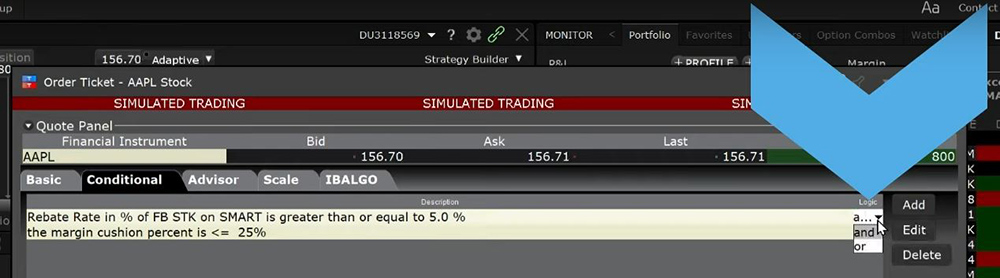
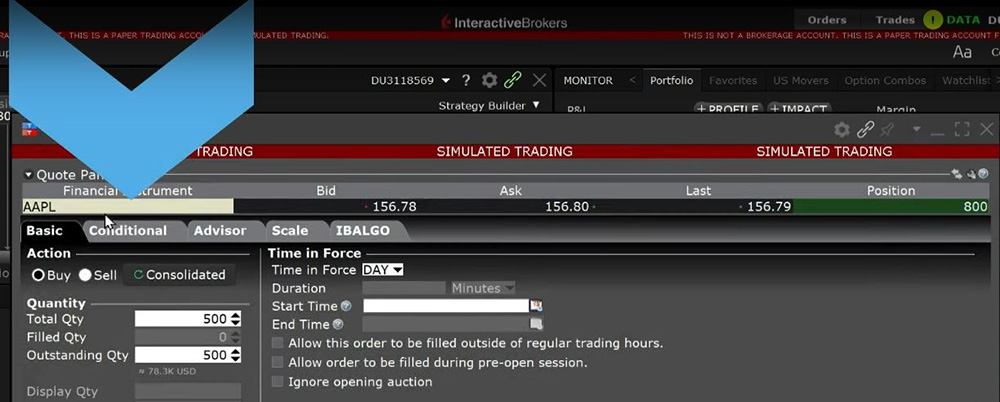 I will add a second condition by clicking on the Add button, choosing Margin Cushion, and next. I’ll choose less than or equal to 25%. On the far right of each condition is the word “and”. You can choose whether multiple conditions need to be met, some conditions need to be met, or just one of the conditions needs to be met by switching between “and” and “or”. For this order set the conditions so either one will trigger the order by changing and to or.
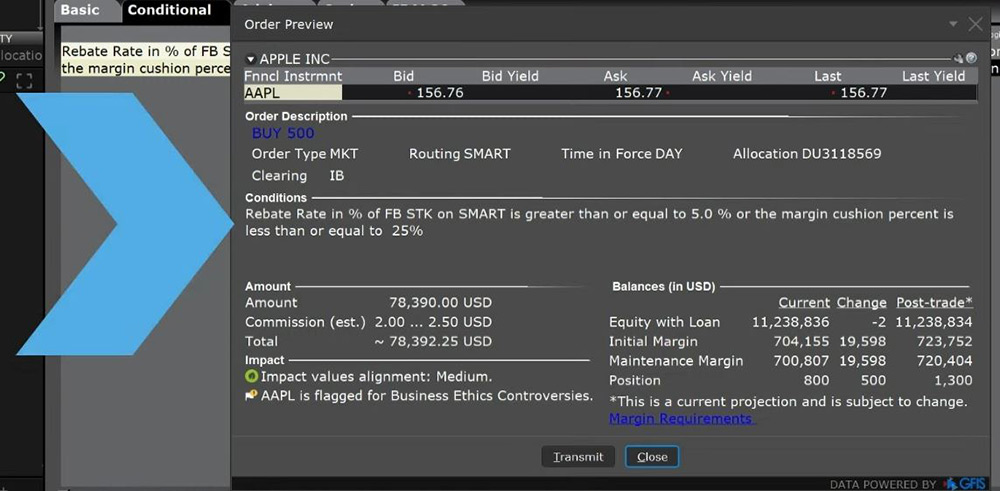
  When everything is set click Preview on the bottom left-hand corner and the Order Preview box will appear. In the middle the Conditions section displays a summary of the condition or conditions needed for the order to be submitted. When ready click Transmit in the lower left-hand side. The order will populate the Activity panel with a green background for the row indicating it is a Conditional Order.
  Once the order is sent and has not been activated you can go in and change the conditions and/or order details by right clicking on the row and selecting Modify, then either Order ticket or Condition. Selecting Condition will take you directly to the Conditional tab while if you select Order Ticket you will have to click on the tab when the Order ticket appears on the screen. Once you are in the Conditional tab click on one of the Conditions. Let us choose margin cushion. Click on Edit on the right-hand side. We will change the Condition parameters to 20%. Click Finish. Click Transmit. Conditional Orders allow the user to create an order dependent on a single or multiple defined stipulations to trigger it. They can be extremely useful in preventing an order from being sent unless certain circumstances become true.
For specific platform feedback and suggestions, please submit it directly to our team using these instructions.
If you have an account-specific question or concern, please reach out to Client Services.
We encourage you to look through our before posting. Your question may already be covered!
Is it possible to use (or reuse) the same set of conditions for multiple orders. E.g. If I am trading options spreads, but legging in (vs creating a combo), and I want to use the same set of conditions to enter all legs of the trade (with independent orders), can I do that? (it’s a bit tedious re-entering the same conditions over and over again)
Is there a way to create a conditional order that will cancel another conditional order? i.e. original order with price condition x to buy a second order with price condition Y to cancel the original order if price exceeds Y?
Hello – do I need to keep TWS client running once I submit a conditional order, or are the orders handled on your servers? It shows me “order being held and monitored” but I’m not sure if the conditional logic is client or server side. Thank you
hello, im trying to placer a conditional order into an already existing limit order and under conditional its greyed out, it doesnt let me select ADD or anything. whats wrong?
conditional order functions dont seem to be available at all with my TWS MAc os version, why is this?
Same issue here, please kindly reply us. “hello, im trying to placer a conditional order into an already existing limit order and under conditional its greyed out, it doesnt let me select ADD or anything. whats wrong?”
Hi, I tried again, and found out for stock orders, I can set up as a conditional order no problem. However, the ADD greyed out when I try to set up a option or a option combo orders. you mentioned it works for option orders as well. Please advise, Thx! Same issue here, please kindly reply us. “hello, im trying to placer a conditional order into an already existing limit order and under conditional its greyed out, it doesnt let me select ADD or anything. whats wrong?”
How do I place an order for Index A when my order for Index B was filled?
ps I have looked at conditional order and didn’t find anything to specify a reference order. I also looked at attached orders and pair order seemed ok but it didn’t let me place the pair order for the IRA account and defaulted to my regular trading account.
Hello, how does “if an instrument is traded” conditional order works? Imagine if I hold stock XYZ, I already placed a limit sell order. I want to create a new limit buy order conditional to my active limit sell order being executed. Is this the way to do this?
The analysis in this material is provided for information only and is not and should not be construed as an offer to sell or the solicitation of an offer to buy any security. To the extent that this material discusses general market activity, industry or sector trends or other broad-based economic or political conditions, it should not be construed as research or investment advice. To the extent that it includes references to specific securities, commodities, currencies, or other instruments, those references do not constitute a recommendation by ARC to buy, sell or hold such investments. This material does not and is not intended to take into account the particular financial conditions, investment objectives or requirements of individual customers. Before acting on this material, you should consider whether it is suitable for your particular circumstances and, as necessary, seek professional advice.
The views and opinions expressed herein are those of the author and do not necessarily reflect the views of Arclight Capital, its affiliates, or its employees.
The order types available through Arclight Capital's trading platforms are designed to help you limit your loss and/or lock in a profit. Market conditions and other factors may affect execution. In general, orders guarantee a fill or guarantee a price, but not both. In extreme market conditions, an order may either be executed at a different price than anticipated or may not be filled in the marketplace.










Can you place conditional orders for options combos?
Hi Danie, thank you for reaching out. Yes, you can place conditional orders for options combos. If you have any other questions, please let us know.
Can I place a closing order to be executed on or before a specified date or at, say for example, 21 DTE?
Hello, thank you for reaching out. You can review all our available Order Types on our webpage: https://spr.ly/IBKR_OrdersCampus
Can a conditional order be placed to become activated at a specific date?
Ex. on monday, enter sell on market close order that activates Friday on open
Hello Richard, we appreciate your question. For conditional orders, you can choose from and combine logical conditions from Price, Time and Volume variables using operators of equal to, greater or less than. You can review this page for more details: https://arclightcapital.cc/en/index.php?f=584. We hope that helps!
HI
Is there any presets or hotkeys available for conditional orders?
Hello Raj, thank you for asking. We have a user’s guide page that covers HotKeys, including creating them for a specific order type. Check it out here and let us know if you have any more questions: https://www.ibkrguides.com/tws/usersguidebook/configuretws/hotkeys.htm?Highlight=hotkeys#XREF_39191_To_create_a_Buy
Could you please clarify what the “Percentage Change” condition means? Is this %change from previous closing price, opening price, high/low price during the day (what about outside RTH?), or how is it defined?
Thank you for asking, Anonymous. The Change % is the difference between the last price and the close on the previous trading day (regular trading session). In the future, you can however over a column in TWS to get the tooltip description. We hope this helps!
Can I place conditional order to buy option once stock reaches specific price ?
Hello Kastytis, thank you for asking. Conditional orders allow the user to attach one or more stipulations that must be true before the order can be submitted. This might allow an investor to only buy/sell an option if its underlying is trading above or below a specified level. For more information and an example, please visit https://arclightcapital.cc/en/index.php?f=584.
can I include a “open price of a stock less than $10” as a condition? Thanks
Hello Jeff, thank you for asking. This should be possible based on our user guide page on the conditional order type (https://www.ibkrguides.com/tws/usersguidebook/specializedorderentry/conditional.htm) which states, “Select whether the price of the contingent asset should be less than or equal to (<=) or greater than or equal to (>=) the trigger price.” Please let us know if you have any other general questions.
Hi, in what order do the “and” and “or” operators work? What if I want to create condition= condition_1 AND (condition_2 OR condition_3)? Thanks
Hello Yuri, we appreciate your question. To confirm the logic for your conditional order, you can create a web ticket. There is a “How to Use” category in the Secure Message Center.
What happens if I set up the condition = (condition_1 OR condition_2 AND condition_3)? According to the rules of Boolean logic, the AND operation must be performed before the OR operation. Is that how it works?
Hello Juri, we appreciate your question. To confirm the logic for your conditional order, you can create a web ticket. There is a “How to Use” category in the Secure Message Center.
What is the default method in create condition dialog using Price as a factor? How can I change this “default”?
Thank you for asking, Da. When you add a price condition in TWS, a window pops up that allows you to configure the condition. It will have several blank fields that you will have to fill out (underlying symbol, trigger method, operator, and trigger price). Please review this webpage for an example: https://arclightcapital.cc/en/index.php?f=584
Is it possible to set the limit price at the time of the condition automatically? e.g. when conditions are true, set limit to (ask + $0.05) –> $0.05 above ask
e.g. when conditions are true, set limit to (mid*1.01) –> 1% above mid
Thank you for reaching out, Anonymous. This is a good question, and we encourage you to create a web ticket to get the best answer for it. There is a category for “How to Use.”
I have already create an option combo and buy it, and I wanna close it when the underlying stock hit a specific price level. If I place a sell order of that option combo with price condition , will the order sell the existing option combo I bought previously or just to sell a new option combo to get the option premium
Hello Samuel, thank you for reaching out. Please view this FAQ for more information on Conditional Orders. We hope this helps!
Conditional Orders | Arclight Capital
Conditional orders let you attach one or more conditions that must be true before the order can be submitted
../../../index.html
In TWS can I place a conditional order which is dependednt on another order being filled e.g I have a diagonal spread that is only filled if my Call spread is filled
Hello Femi, thank you for reaching out. Conditional orders allow the user to attach one or more stipulations that must be true before the order can be submitted. Please view the link below for more guidance on how to place a Conditional Order in TWS:
https://arclightcapital.cc/en/index.php?f=584
We hope this helps!
How does the logical operator precedent work ?
The UI Has (for example)
Price XYZZY > 100 AND
Time > 12:00 AND
PRICE ABCD 100 AND TIME > 12:00) OR (PRICE ABCD 100) AND (TIME > 12:00 OR PRICE ABCD < 200)
Maybe Soe other way?
Hello David, thank you for reaching out. Conditional orders allow the user to attach one or more stipulations that must be true before the order can be submitted. Please view this webpage for additional information about conditional orders: https://arclightcapital.cc/en/trading/orders/conditional.php
We hope this helps!
Hi, how can I save the conditional order? It is troublesome to enter it everyday.
Hello, thank you for reaching out. In TWS, you can save a conditional order by clicking the “Save” icon in the Conditional Order box. This will save the order for later use. Please view this webpage for more information: https://arclightcapital.cc/en/trading/orders/conditional.php
We hope this helps!
How to buy an option contract at the ask price if the underlying reaches a certain price level?
Hello Sampad, thank you for reaching out. This FAQ addresses your question: https://www.ibkr.com/faq?id=94320701
in my account i set up a conditional order to sell X share of QQQ Nasdaq stock if the close is >= a certain price, i used the trade type of LOC so it would only execute if close was > my limit price, but when i tried to transmit the order it said only trade type LMT can be used but i am concerned that would execute anytime during the day if the condition is met, i only want it executed if close satasfines the >= price i set??? how to do this or will LMT work????
Hello, thank you for reaching out. Please view this FAQ for instructions to create a Conditional Order:
https://www.ibkr.com/faq?id=28224878
We hope this helps!
I like the conditional order features. Is there also a way to cancel based on time or price?
For example: Cancel if AAPL is less than or equal to $170 or Cancel if past a certain date/time?
Hello, we appreciate your question. There is no way to specify a time or price at which a conditional order will automatically be cancelled. You need to manually cancel the order if you no longer want it to be eligible to become active.
We hope this helps!
Are conditions based on % change in the price of a instrument sensitive to positive and negative percentage changes? That is to say, do I need to specifically write -0.5% or 0.5% as a condition, or will both be triggered up and down movements be triggered if I write 0.5%?
Why are you not able to place trail buy and trail sell orders as part of conditional orders? An error appears when you try to transmit the order saying that trail orders are not available as part of conditional orders? What solutions are available for this?
Hello Daniel, thank you for reaching out. Please review our available order types on our website: https://spr.ly/IBKR_OrdersCampus
L.s., Would it be possible to add the option to buy based on the RSI? Thank you and regards.
Hello, thank you for asking. Unfortunately, we do not support triggering orders based on technical indicators. Please note that the most comprehensive configurable triggers are based upon alerts.
https://www.ibkr.com/faq?id=27288664
Hi, can the conditional order be based on the movement or price of an indices eg SPX or NDX? when i try i get an error, and have to use SPY ETF or QQQ ETF instead. Am I doing something silly or not enabling the correct permissions?
Hi Gavin, thank you for asking. A conditional order is an order that will automatically be submitted or cancelled ONLY IF specified criteria for one or more defined contracts are met. You can use stocks, options, futures or security indexes to trigger a conditional order. Types of conditions include Price, Margin Cushion, Volume, Percentage Change, Daily P&L, Trade or Shortable Shares. You can learn more here: https://www.ibkr.com/faq?id=28224878
Hi
I have placed the following order
SELL 1 Future MCL OCT 24 at LMT 77.77
Condition : If P&L >= 80 CANCEL
*************************************************************
It did not work
P&L was 136, the order was not canceled
Hello, thank you for reaching out. For a time-sensitive trading issue, we recommend contacting Client Services: https://spr.ly/IBKR_ClientServicesCampus
Hi. I placed the following order SELL 1 ES Mar21’25, Order Type = LMT, Limit Price = 5950.0 and Time in Force = GTC. Condition: default price of SPY STK on SMART is >= 588.23 and time >= 20250103 15:59:59 and time <= 20250103 16:00:01 The order never got placed even though the condition was met with SPY closing price (16:00:00) being 591.95.
Hi Anonymous, thank you for commenting. For a concern/question about a particular trade, please create a detailed web ticket for Client Services to investigate: https://spr.ly/IBKR_TicketCampus
Hi, How can I set a condition to sell a option contract which is at the money and the contract is trading below a certain price for example $15
Hello Dipen, thank you for asking. Please view this FAQ for instructions on how to trade an option when the underlying reaches a certain price in TWS: https://arclightcapital.cc/faq?id=94320701
We hope this helps!
Hi. Is it possible to attache a condition to close an option combo, if another option combo stops out?
Hello, thank you for reaching out. Please view this FAQ for more information: https://arclightcapital.cc/faq?id=94320701
We hope this information is helpful!
Good morning. I’m an options trader and would like to know how I can set up a conditional order (OSO order sends order), for example. I have an initial conditional order to buy a put if the SPX is >= 5500. What I’m interested in is triggering a second order (for example, selling that put if SPX <= 5550). Thank you.
Hi Jordi, thank you for asking and we apologize for the delayed response. You can set up an independent conditional order. We hope this helps.
I don’t see this option in the macbook app. How do I enable it or is it only available in the windows app?
Hello, thank you for asking. Conditional order types are available on all our platforms. For more instructions, please review this webpage: https://spr.ly/IBKR_OrdersCampus
If you continue to experience difficulties, please contact Client Services: https://spr.ly/IBKR_ClientServicesCampus
Hi, I have the following challenge: I’d like to close an option combo (Call Butterfly) if the position’s delta drops below a certain value (<-0.07 in that particular case). Unfortunately, the position's delta is not a condition one can chose in the condition dialog box. Just price, time, margin etc is available. How can I solve that problem ? Kind regards from Munich Stefan
Hi Stefan, thank you for reaching out. You can attach a Delta hedge order by following these instructions: https://arclightcapital.cc/faq?id=117400112
We hope this information is helpful!
Hi, I have the following challenge: I’d like to close an option combo (Call Butterfly) if the position’s delta drops below a certain value (<-0.07 in that particular case). Unfortunately, the position's delta is not a condition one can chose in the condition dialog box. Just price, time, margin etc is available. How can I solve that problem ? Stefan
Is there a way to place a trail stop once price hits a certain target? Ive been trying to figure this out for some time now with no answers. If not this is a basic function that could be added to your service. If Its not available please say so.
Is there a way to show the currently set trigger (price) in the watchlist of pending orders (i.e. like with standard LMT / STP orders) so that it is easier to keep an overview and modify the trigger when neened? Thank you
Hello Manuel, thank you for asking. Yes, this is possible. Trigger Price is an available data column in the Activity Panel. We hope this helps!
my order ticked looks different. no conditional order tap there. is my account limited or something?
Hello, thank you for asking. Please view which order types you can attach a condition to here: https://arclightcapital.cc/faq?id=61918224
If you continue to experience difficulties, please create a detailed web ticket for Client Services to investigate: https://spr.ly/IBKR_TicketCampus
Cómo puedo cerrar una cuenta de opciones condicionada por DELTA , no encuentro la opcion
Hola, gracias por contactarnos. Lamentamos que se vaya. Consulte estas preguntas frecuentes para obtener instrucciones sobre cómo cerrar su cuenta de ARC: https://arclightcapital.cc/faq?id=27283853
I try to setup a market stop loss that will trigger only when the close price reaches a threshold (I don’t care about intraday price fluctuations). It looks like there is no such possibility. I’ve tried to use date/time for it, but you cannot set it up to run every day.
Hello, thank you for reaching out. Please review our available Order Types on our webpage: https://spr.ly/IBKR_OrdersCampus
We hope this helps.